Pages

Showing posts with label weepeetv. Show all posts

Monday, January 21, 2013

New features added to WPTVdroid

New features recently added to WPTVdroid:

Channel guide (with current and next running show) added when you click long on the selected channel.


Channel preview, go to menu and select "Channels preview", this will briefly connect to every channel and will show you a screenshot of the current program. Just click on the screenshot to go to the selected channel.
(sometimes the screenshot will not be very clear/show artifacts.. haven't found a solution for this yet)
(this feature adds about 10MB to the WPTVdroid installation, if you don't have that much space don't use this version)


Downloads on http://blog.42.be/p/weepeetv.html

Any new features/ideas you would like to have added? Leave a comment or contact me @42wim


Thursday, January 10, 2013

Simple WeepeeTV recorder


Created the record.pl script, with this simple script you can record WeepeeTV streams.

Unfortunately the WeepeeTV streams aren't that stable and ffmpeg (which is used to record) can't append recordings, so sometimes your recordings may not be complete.

How it works

Basically it will create a small shell script in /tmp which will be queued as an at job at the time you specified. This script will be executed at the specified time and will be calling ffmpeg to save the stream to a .mkv file in the outputdirectory you've specified.

Config

To run the script change the variables on top of record.pl


#make sure your ffmpeg supports https
my $FFMPEG="/usr/bin/ffmpeg-weepeetv";
my $ATCMD="/usr/bin/at";
#locations of xml source file
my $XMLFILE="wptv.xml";
#where to write the recordings
my $OUTPUTDIR="/opt/recordings";
#installation directory
my $PATH="/home/wim/wptvscraper";

Usage


record.pl --start=<time date> --duration <hh:mm:ss> --desc <description> --channel <name>

e.g.  perl record.pl --start=15:00 tomorrow --duration 00:30:00 --desc "crappy show" --channel een
records 30 minutes starting tomorrow at 15h on channel 'een'

<time date> can be anything 'at' supports, see 'man at'

Other options:
        --channels (shows available channels)


You can find the code on https://github.com/42wim/wptvscraper

Saturday, January 5, 2013

WeepeeTV and VLC (2)


Created createwptvxml.pl and weepeetv.lua (for use with vlc)

createwptvxml.pl is a simple screenscaper perl script (yes it's written in Perl and not in a cool language like Python or Ruby) which logs in on the WeepeeTV site and creates an XML containing the necessary m3u8 stream URLS.

This XML can be used to feed other applications on your local network e.g. for use with VLC (see weepeetv.lua)
The xml file format is as follows:
<?xml version='1.0'?>
<items>
<item>
<title>channel</title>
<thumb>https://weepee.tv/img/channels/channel.jpg</thumb>
<h264>https://weepeetv.my-stream.eu/channel/uuid/channeluuid/stream.m3u8</h264>
</item>
</items>

To run the script change the variables on top of createwptvmxl.pl
## change these variables
my $ACCOUNT="uxxxxxx";
my $PASSWORD="secret";
my $CURL="/usr/bin/curl";
my $XMLFILE="wptv.xml";
my @sort=("een","canvas","bbc1","bbc2","acht","vtm","2be","vitaya","jim","ketnet","bbcentertainment","kanaalz","vtmKzoom,"tvllogosmall","livetv");

You can find the code on github

Thursday, January 3, 2013

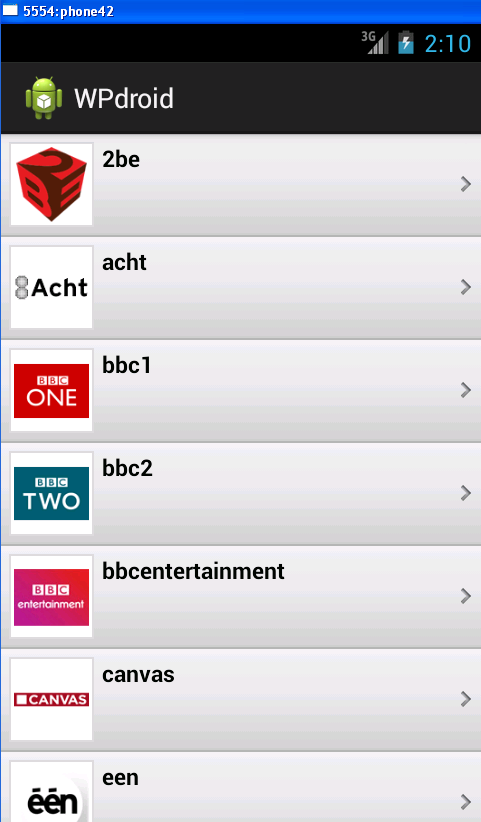
Unofficial WeepeeTV android app (beta)

Found a workaround for the cookie problem by using a native app (Curl).

This allowed me to do the screenscraping with curl and the parsing on android itself.

For the backend I picked MXplayer, the nice thing about it is that it has HLS support, so you'll be able to stream WeepeeTV on older Android versions too. - I got it running on my HTC Wildfire S (although very slowly, no hardware decoding).

Of course this also allows you to have full screen and you're able to change your aspect ratio.

(The not so nice thing about MXplayer is that it doesn't support https urls, so I included stunnel to do the https offloading)

Some screenshots when running on my 7" ICS tablet.

So there still has to be done some polishing, like decent error handling ;-)
But for now it works for me.

If anyone is interested in beta-testing this contact me on twitter (@42wim)

Friday, December 28, 2012

Invalid cookies on Android & WeepeeTV

I'm trying to build an android application that logs in on the weepeetv website and does the parsing/screenscraping directly on android.

Unfortunately, the weepeetv site is setting cookies with an incorrect Expire date.

Android does not like this.

W/ResponseProcessCookies(20386): Invalid cookie header: "Set-Cookie: snip; expires=; path=/; 
isSecure=false". Unable to parse expires attribute:

I've been trying to use different http implementations: HttpClient versus HttpURLConnection but to no avail.  


Nothing works.


So the only solution I found is doing the parsing on Linux, running a webserver with the parsed XML file and providing this to the android application. (or compiling curl for android, but this is too much work for now :)

This works.


The next challenge is actually playing those streaming files. (hint: https)


Thursday, December 27, 2012

WeepeeTV and VLC

Started testdriving WeepeeTV this week, bought a subscription for a month (for now).
You can watch tv (SD quality / H264 encoded) using flash (cpu intensive) or HLS.

Unfortunately there's no API available.

But with some creative screenscraping and parsing a lot of fun stuff can be done. 
One example below is a VLC plugin which uses my own xml file (created by screenscraping) as a source.
Very easy way to switch channels without clicking too much or using a browser.


I will put my xml creating script on github, so you can use it too :-)

To use this lua script put it in the lua/sd directory and call it weepeetv.lua
Ofcourse you need to change the parse_url to your own server or local file.

--SD_Description=WeePee TV
--[[
 Authors: 42wim

 This program is free software; you can redistribute it and/or modify
 it under the terms of the GNU General Public License as published by
 the Free Software Foundation; either version 2 of the License, or
 (at your option) any later version.

 This program is distributed in the hope that it will be useful,
 but WITHOUT ANY WARRANTY; without even the implied warranty of
 MERCHANTABILITY or FITNESS FOR A PARTICULAR PURPOSE.  See the
 GNU General Public License for more details.

 You should have received a copy of the GNU General Public License
 along with this program; if not, write to the Free Software
 Foundation, Inc., 51 Franklin Street, Fifth Floor, Boston MA 02110-1301, USA.
--]]

require "simplexml"

function descriptor()
    return { title="WeePee TV" }
end

function main()
local tree = simplexml.parse_url("http://192.168.x.x:8080/input.xml")
    for _, items in ipairs( tree.children ) do
        simplexml.add_name_maps(items)
        local url = vlc.strings.resolve_xml_special_chars( items.children_map['h264'][1].children[1] )
        local title = vlc.strings.resolve_xml_special_chars( items.children_map['title'][1].children[1] )
        local arturl = vlc.strings.resolve_xml_special_chars( items.children_map['thumb'][1].children[1] )
        vlc.sd.add_item( { path = url, title = title , arturl = arturl } ) 
    end
end